
Scroll through your feed and chances are—at least one post, caption, or ad was created by AI.
From viral Instagram captions and auto-edited Reels to personalized LinkedIn outreach, artificial intelligence is rapidly reshaping how we create, share, and grow on social platforms.
AI for social media 🧠 isn’t about robots replacing marketers — it’s about helping creators, solopreneurs, and brands do more, in less time, with better results.
Whether you’re managing your own brand, running client campaigns, or just exploring smarter content creation tools, this 2025 guide is built to give you everything you need to win with AI.
Let’s break it down simply: what it is, how it’s used, which tools to trust, and what’s coming next.
What is AI for Social Media?
AI for social media refers to using artificial intelligence technologies to:
- Automate repetitive tasks (like scheduling or replying to comments)
- Generate creative content (like posts, captions, and videos)
- Analyze trends and performance
- Engage audiences in smarter, personalized ways
In short: AI helps you market better and faster without burning out.
Simple Examples of AI in Action:
- Instagram captions written by GPT-based tools like SocialPost.ai
- TikTok Reels generated using AI video editors like Pictory
- Smart scheduling with best-time suggestions by Pallyy
- Auto-replies to DMs and comments using chatbots
In 2025, AI isn’t just a productivity hack — it’s the foundation of competitive social media strategy.
Why It Matters in 2025
Here’s the reality:
- Social platforms are noisier than ever
- Content demand is nonstop
- Algorithms now prioritize speed, engagement, and quality
AI helps marketers keep up without hiring big teams or burning the midnight oil.
Benefits of using AI for social media:
- 💨 Speeds up ideation, writing, design, and publishing
- 📊 Improves targeting, timing, and ROI
- 🔄 Allows repurposing content across platforms
- 🔍 Provides insights that improve future content
- 💡 Helps small creators compete with big brands
Real-World Applications of AI in Social Media
AI is no longer a “nice-to-have.” It’s now deeply embedded in how smart marketers create, schedule, and analyze social media content.
Let’s look at the practical ways AI is being used daily in 2025:
1. AI for Captions, Hashtags & Comments
AI-powered copywriting tools now generate:
- Post captions tailored to your niche
- Suggested emojis, CTAs, and tone variations
- Relevant hashtags based on topic and trends
- Automated comment replies using pre-trained prompts
Example:
You write “I just launched my new eBook.”
An AI tool like SocialPost.ai turns that into:
“🚀 Just launched! Dive into the insights behind my new eBook that took 3 months to create. Available now. #MarketingTips #eBookLaunch”
✅ Best for: Instagram, LinkedIn, Facebook, X/Twitter
2. AI for Videos & Reels
Creating short-form videos used to take hours.
Now? AI video generators handle:
- Scene transitions
- Script-to-video in minutes
- Auto-subtitles, music, and resizing
- Social-ready templates
Popular Tools:
- Pictory: Turn blogs into narrated videos
- InVideo AI: Drag-n-drop AI reel maker
- CapCut AI Tools: Used widely by creators
✅ Best for: TikTok, Instagram Reels, YouTube Shorts
3. AI-Powered Design Tools
Need a graphic in under 5 minutes?
AI-based design tools can:
- Create banners, thumbnails, and post layouts
- Suggest color schemes and font pairings
- Even generate images using text prompts!
Example Prompt:
“Design a promotional post for a digital course on AI-powered Instagram growth.”
Best Tools:
- Canva AI (Magic Design)
- Adobe Firefly
- Bing Image Creator
- Leonardo AI (advanced generation)
✅ Best for: Static feed posts, carousels, story graphics
4. AI for Scheduling & Auto-Publishing
No more guessing when to post or manually publishing each post.
AI schedulers can now:
- Detect your audience’s best engagement windows
- Suggest optimal content types per time slot
- Automatically republish high-performing posts
- Manage multiple platforms from one dashboard
Best Tools:
- SocialPost.ai Scheduler
- Pallyy
- Later AI
✅ Best for: Agencies, creators, and busy solopreneurs
5. AI for Analytics & Performance Monitoring
Once your content is live, AI doesn’t stop.
It analyzes:
- Engagement patterns
- Follower growth trends
- Conversion insights
- Sentiment analysis on comments
Use cases:
- Knowing what time your reels go viral
- Understanding what kind of captions drive saves
- Automatically identifying underperforming posts
Tools that help:
- Buffer Analyze
- SocialPost AI (built-in dashboard)
- Hootsuite Insights
✅ Best for: Data-driven marketers & teams optimizing ROI
💡 Pro Tip:
Combine multiple tools into a single workflow.
Example:
→ Write with Jasper → Design with Canva AI → Schedule via SocialPost.ai → Track results with Pallyy
🧰 Best AI Tools for Social Media in 2025
The AI tool landscape is crowded — but a few standouts consistently deliver results across content, visuals, scheduling, and analytics.
Here’s a curated list by category 👇
🧠 AI Tools for Content Creation
| Tool | Features | Free Plan |
|---|---|---|
| SocialPost.ai | AI captions, scheduler, content planner | ✅ |
| Jasper | Long-form AI writing, brand voice memory | ❌ |
| Copy.ai | Templates for social ads, posts, and CTAs | ✅ |
| Ocoya | Reposts, hashtags, auto-designs with captions | ✅ |
🔹 Why Use These?
They save hours of brainstorming, writing, and formatting content — especially for Instagram, LinkedIn, and short-form captions.
🎨 AI Design & Visual Tools
| Tool | Use Case | Output |
|---|---|---|
| Canva AI | Banners, carousels, videos, brand kits | Static + Video |
| Bing Image Creator | Generate AI visuals with text prompts | Static |
| InVideo AI | Reels, Shorts, Ad Videos | Video |
| Leonardo AI | Advanced, stylized image creation | Static |
🔹 Why Use These?
Design consistency and visual content quality are now expected by every audience. AI helps you stay polished and fast.
📅 Scheduling, Publishing & Planning
| Tool | Special Feature | Free? |
|---|---|---|
| SocialPost.ai | AI content calendar, auto-posting | ✅ |
| Pallyy | Grid view, analytics, client-ready dashboard | ✅ |
| Publer | Watermarking, AI content, queue-based publishing | ✅ |
🔹 Why Use These?
Posting manually is outdated. These tools handle multi-platform scheduling, ideal times, and even recycling top-performing posts.
📊 Analytics & Insights
| Tool | Best For |
|---|---|
| Buffer Analyze | Engagement reporting |
| SocialPost.ai | Unified dashboard |
| Hootsuite Insights | Trend tracking + audience analysis |
🔹 Why Use These?
Use data to double down on what works. From time-of-day performance to sentiment, AI helps you stop guessing.
How to Build a Full AI Social Media Workflow (Step-by-Step)
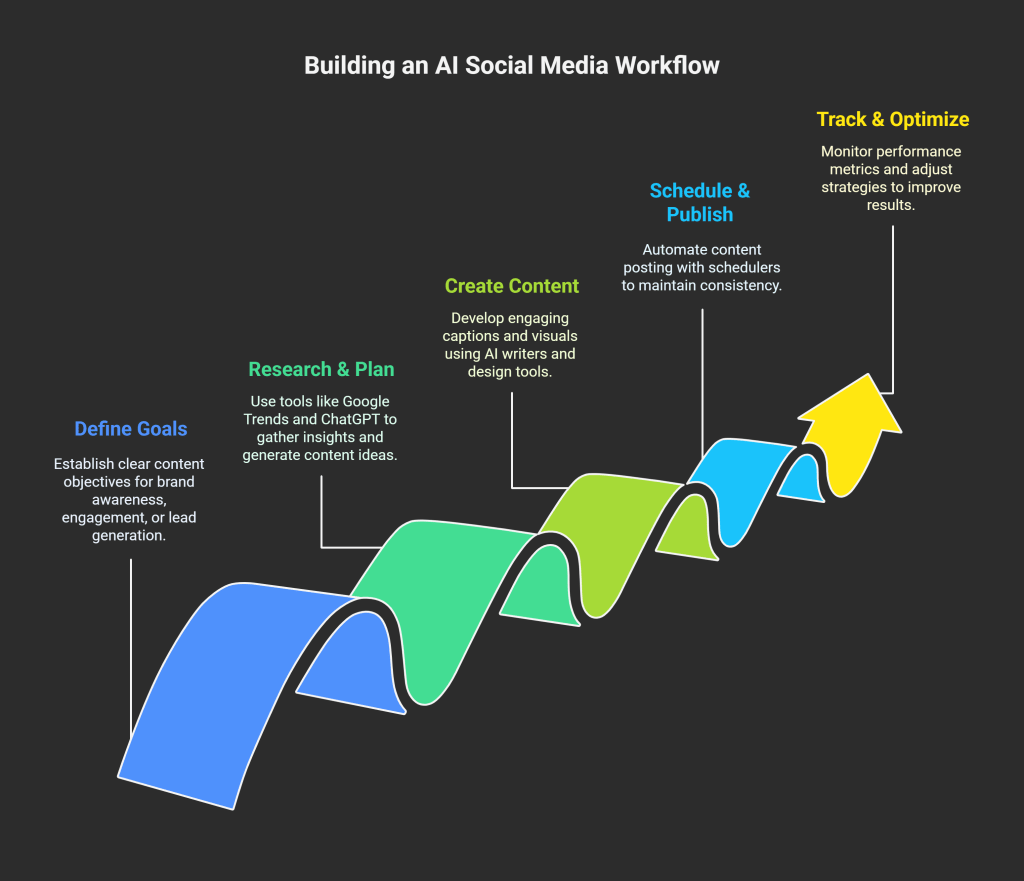
Let’s simplify it. Here’s how to run an entire content system using AI tools:
Step 1 – Define Your Goals
Start with your content goals:
- Brand awareness?
- Engagement?
- Lead generation?
Align your AI strategy around this.
Step 2 – Research & Plan Content
Use:
- Google Trends + Social listening tools
- PAA questions + competitor analysis
- AI prompt tools to generate content ideas
Tools: SEMrush, ChatGPT, Frase
Step 3 – Create Captions & Visuals
Use an AI writer for captions (e.g. SocialPost.ai) and a design tool (e.g. Canva AI).
Tips:
- Customize tone (funny, professional, sarcastic)
- Use AI hashtag suggestions
- Add calls to action like “Save this” or “Try this tip!”
Step 4 – Schedule & Auto-Publish
Use a scheduler to:
- Choose the best post times
- Queue 7–30 days of content
- Set recurring content (e.g. “Tip Tuesdays”)
Step 5 – Track, Learn & Optimize
Monitor:
- Likes, shares, saves
- Follower growth
- Click-through rate (for links or landing pages)
Tools: Buffer, SocialPost.ai analytics
Use that data to:
- Reuse what works
- Pause what doesn’t
- Test new formats (e.g., Reels vs Carousels)
Pros and Cons of Using AI for Social Media
Pros: Why AI Makes Sense in 2025
1. Saves Time (a lot of it)
From captions to scheduling, AI speeds up repetitive tasks that once drained hours.
2. Improves Consistency
Posting regularly is easier when you’ve got a smart system helping you plan and auto-publish.
3. Boosts Engagement
AI can optimize posting times, write better hooks, and recommend engaging visuals.
4. Makes You Data-Smart
You’ll make decisions based on real performance metrics — not guesses.
5. Levels the Playing Field
Small businesses and solo creators can compete with agencies and brands.
Cons: The Honest Limitations
1. Lacks Human Emotion
AI still struggles to perfectly capture raw, authentic storytelling.
2. Needs Human Oversight
Blindly trusting AI can lead to tone-deaf posts, off-brand visuals, or awkward replies.
3. Can Sound Generic
If you don’t personalize the output, your posts may sound like everyone else’s.
4. Dependency Risk
Overusing AI might lead to creativity blocks or loss of brand voice over time.
✅ Takeaway: Use AI as a co-creator, not a replacement.
Trends to Watch in AI for Social Media
AI isn’t slowing down. Here’s what’s gaining momentum in 2025:
AI-Generated Influencers
Meet Milla Sofia — a fully AI-generated Instagram influencer with over 100k followers.
Expect more brand collaborations with digital personas.
Voice & Video Cloning
Create Reels and TikToks using cloned voices or faces (ethically, of course).
This is especially useful for faceless content creators.
Predictive Post Performance
AI tools will soon tell you how likely your post is to go viral — before you even publish it.
AI Storytelling Tools
Expect drag-and-drop story builders that create Instagram stories, Pinterest pins, and even carousels based on a blog link or prompt.
FAQs About AI for Social Media
Q: Can AI really write good social media posts?
Yes — especially for hooks, CTAs, and captions. Human editing still improves authenticity.
Q: Will AI replace social media managers?
Not fully. AI is a powerful assistant, but strategy, empathy, and community-building are human strengths.
Q: What’s the best free AI tool for social media?
Try SocialPost.ai for content + scheduling, or Canva AI for visuals.
Q: How do I start using AI with no tech skills?
Choose beginner-friendly tools with templates. Most work on drag-and-drop or prompt-based setups.
Q: Is AI content penalized by Google or Instagram?
Not if it’s helpful, humanized, and value-driven. Use AI to assist, not replace, quality.
In 2025, if you’re still managing your social media manually — you’re not working smart.
AI is no longer a futuristic experiment. It’s a real-world, revenue-driving assistant.
Whether you’re building a personal brand, growing an agency, or just trying to be more consistent online — the right AI tools will save you time, money, and creative energy.
And the best part?
You don’t need to be a tech genius.
You just need to start with the right tools and a repeatable workflow.
Ready to Take the Next Step?
👉 Start free with Social Post — your AI-powered social content generator, scheduler, and growth assistant.
No fluff. Just smart content, done in minutes.

 AI 4 Social